Case Study | POCUS Focused

A Custom-Built Learning Platform

Designing a Learning Platform for Physicians

How I led design and frontend development on a custom learning management system built from scratch to replace an off-the-shelf LMS for a business that creates educational courses for physicians.

9 mosDiscovery → Launch
6User roles supported
1,000+Active users in 3 months
50%Faster course creation

Overview

The Challenge, My Role & the Impact

POCUS Focused teaches point-of-care ultrasound to physicians through online courses that count toward continuing medical education (CME) credit for their ongoing licensure. The previous off-the-shelf LMS helped them build a paying audience, but as the business grew, the platform got in the way and limited how they could deliver content. My business partner and I designed and built a replacement they fully own, giving them the flexibility they wanted.

The Challenge

Six roles. Multiple group types.

The biggest challenge we faced was supporting multiple user types on both the business and end-user sides: four business user roles, three end-user group types with access to different features, and two end-user types whose experience changed based on group type. This created complexity and unforeseen requirements that emerged in the last few months of development.

My Role

Lead Designer + Frontend Developer

I led the project's design, owning user flows, information architecture, the design system, and every screen. I then built most of the frontend in React and TypeScript while my partner built the backend. Designing and building the same product meant design intent never got lost in handoff, but it also required me to juggle two distinct sets of responsibilities.

Impact

Key success metrics

  • 1,000+ active users in the first three months after launch
  • 26 courses migrated from the legacy LMS
  • 50% faster course creation
  • And a custom-built platform the client now owns

Foundations

Designing Around Content That Already Existed

Most greenfield projects start with a blank screen, but this one started with a 26-course library built around another platform's structure. My first task was to determine how much of that structure was valuable and what needed to change. In our first month, I audited the existing platform and mapped out all features and workflows, including course building and management, user management, course completion, subscriptions & course purchasing, analytics, and more. I then sat down with the business team to understand where the old platform was failing them and where it was serving them.

What We Found

Rigid authoring

POCUS Focused's content relied on a combination of images, video clips, written content, and structured assessments, but the legacy platform heavily dictated how course information could be presented.

Borrowed identity

Branding, marketing pages, and core student workflows had to bend to inflexible page templates and a clunky editor.

One-size-fits-all groups

Worst of all, the old platform couldn't support the variety of users and user groups POCUS Focused served, forcing all user types to share the same UI.

Discovery helped me create a prioritized roadmap focused on content creation and delivery for launch, and deferred features like gamification, CRM integration, and the marketing page builder, which aren't vital to the learning experience, to post-launch implementation.

Our Focus

Design Principles

Three principles guided the design process.

01

Control Without Complexity

A course author should be able to intuitively compose rich, interactive lessons without needing an editor how-to guide, so they can focus on course content instead of wrangling the platform's UI.

02

Learning Between Shifts

POCUS Focused's learners are clinicians who study in short windows between shifts and may need quick access to course material while on the job. The learner experience prioritizes focus, flexible learning material, and making it easy to pick up where you left off.

03

One System, Many Experiences

Every user type shares the same underlying components and patterns, so the product feels like one platform for both the business user authoring a course and the end user managing a residency program or completing a lesson.

The Core Challenge

Designing for Everyone at Once

The biggest design challenge was the sheer number of people the platform had to serve, and how differently each one needed it to work. Users split into two categories, business users and end users, each with its own subtypes. Even within a single end-user role, the experience changes depending on the group a user belongs to.

Business Users

Business user roles as growth rings Four nested rings. Course Viewer at the center, then Course Author, then Admin, with Owner as the outermost ring. Each role includes everything inside it. Owner Admin Author Viewer read-only
Each role grows out of the one inside it

Course Viewer

Reviews course content without being able to edit it.

Course Author

Creates and edits course content as well as supplemental learning content like flashcards, but can't see or manage end users.

Admin

Manages users and groups, invites people to the platform, and emails platform users.

Owner Super Admin

Everything an Admin can do, plus inviting business users and configuring the platform itself.

End Users

Learners

Complete course content, review their learning stats, practice with flashcards and assessments, explore featured content, and download certificates for completed courses.

Group Managers

Set their group's curriculum, manage group seats, and track learners' progress/performance.

Group Types

Residency Programs

Program-managed curricula tailored to each residency level, built around the weeks residents spend on their ultrasound rotation.

Physician Groups

Self-managed groups where the seat manager sets a default curriculum, and individual physicians can adjust their own curriculum if they want to deviate from the group.

How I Approached It

I started by mapping user flows for each role on the business and end-user side, and documenting what each user needed to accomplish. Once I then laid those flows side by side, it showed where roles overlapped across group types and where they truly diverged. That let me design a shared core that every user experiences the same way, then layer role- and group-specific experiences on top only where the needs actually differed.

The hardest part wasn't designing any one experience. It was managing the complexity of orchestrating so many different experiences on the same platform, without making it confusing for the users.

End-User Access, Side by Side
11End-user variants
50Features
550Access decisions
37Conditional rules
End-user access matrix A grid of 50 features across 11 end-user variants: guests, four kinds of individual account, three kinds of group learner, and three kinds of seat manager. Common features are shared by nearly everyone, while curriculum and seat-management features are available to only a few variants. 37 cells are conditional, and no two variants have the same access profile. Common 12 features Learning 11 features Curriculum 7 features Commerce 6 features Seat Management 14 features Features Guest Not signed in Marketing site & specialty pages · Guest, Not signed in: Yes Resources / articles · Guest, Not signed in: Yes Help Center · Guest, Not signed in: Yes Self-serve sign up · Guest, Not signed in: Yes Course catalog & preview · Guest, Not signed in: Yes Cart & one-off purchase · Guest, Not signed in: Conditional — Guests can fill a cart; checkout requires sign-in. Seat managers can technically buy like any signed-in user Subscribe to a plan · Guest, Not signed in: Conditional — Guests must sign in to check out. C for existing subscribers = add or change a plan Free trial / coupon plan · Guest, Not signed in: Conditional — Shows on the account page with a Free trial badge; no Manage billing button 8 Individual Free account Marketing site & specialty pages · Individual, Free account: Yes Resources / articles · Individual, Free account: Yes Help Center · Individual, Free account: Yes Login, password reset, 6-digit code · Individual, Free account: Yes Account › Profile (name / clinician type / specialty) · Individual, Free account: Yes Account › Preferences (email + cookies) · Individual, Free account: Yes Account › Security (change password) · Individual, Free account: Yes Account › Payments (receipts) · Individual, Free account: Conditional — Tab always shown; only has content after a purchase Testimonial submission · Individual, Free account: Yes Dashboard · Individual, Free account: Yes Course catalog & preview · Individual, Free account: Yes Cart & one-off purchase · Individual, Free account: Yes Subscribe to a plan · Individual, Free account: Yes Free trial / coupon plan · Individual, Free account: Yes 14 One-off purchase Marketing site & specialty pages · Individual, One-off purchase: Yes Resources / articles · Individual, One-off purchase: Yes Help Center · Individual, One-off purchase: Yes Login, password reset, 6-digit code · Individual, One-off purchase: Yes Account › Profile (name / clinician type / specialty) · Individual, One-off purchase: Yes Account › Preferences (email + cookies) · Individual, One-off purchase: Yes Account › Security (change password) · Individual, One-off purchase: Yes Account › Payments (receipts) · Individual, One-off purchase: Yes Testimonial submission · Individual, One-off purchase: Yes Dashboard · Individual, One-off purchase: Yes Course catalog & preview · Individual, One-off purchase: Yes Course viewer (lessons / video) · Individual, One-off purchase: Yes Quick Start auto-grant · Individual, One-off purchase: Yes In-course assessments & Recall · Individual, One-off purchase: Yes Topic assessments · Individual, One-off purchase: Yes Flashcards · Individual, One-off purchase: Yes Course completion · Individual, One-off purchase: Yes Certificates · Individual, One-off purchase: Yes Progress stats · Individual, One-off purchase: Yes Drip unlocks + 'New' badge / email · Individual, One-off purchase: Yes Cart & one-off purchase · Individual, One-off purchase: Yes Subscribe to a plan · Individual, One-off purchase: Yes Free trial / coupon plan · Individual, One-off purchase: Yes 23 Subscriber Marketing site & specialty pages · Individual, Subscriber: Yes Resources / articles · Individual, Subscriber: Yes Help Center · Individual, Subscriber: Yes Login, password reset, 6-digit code · Individual, Subscriber: Yes Account › Profile (name / clinician type / specialty) · Individual, Subscriber: Yes Account › Preferences (email + cookies) · Individual, Subscriber: Yes Account › Security (change password) · Individual, Subscriber: Yes Account › Payments (receipts) · Individual, Subscriber: Yes Testimonial submission · Individual, Subscriber: Yes Dashboard · Individual, Subscriber: Yes Course catalog & preview · Individual, Subscriber: Yes Course viewer (lessons / video) · Individual, Subscriber: Yes Quick Start auto-grant · Individual, Subscriber: Yes In-course assessments & Recall · Individual, Subscriber: Yes Topic assessments · Individual, Subscriber: Yes Flashcards · Individual, Subscriber: Yes Course completion · Individual, Subscriber: Yes Certificates · Individual, Subscriber: Yes Progress stats · Individual, Subscriber: Yes Drip unlocks + 'New' badge / email · Individual, Subscriber: Yes Cart & one-off purchase · Individual, Subscriber: Yes Subscribe to a plan · Individual, Subscriber: Conditional — Guests must sign in to check out. C for existing subscribers = add or change a plan Account › Subscriptions + Manage billing · Individual, Subscriber: Yes Renewal + payment-failure notices · Individual, Subscriber: Yes CME claim + statements (Account › CME) · Individual, Subscriber: Conditional — No CME for one-off purchases. Subscribers: plan must include CME. Groups: unless CME is disabled for the group. Tab appears only when the program is live and the learner has eligible months 25 Curriculum subscriber Marketing site & specialty pages · Individual, Curriculum subscriber: Yes Resources / articles · Individual, Curriculum subscriber: Yes Help Center · Individual, Curriculum subscriber: Yes Login, password reset, 6-digit code · Individual, Curriculum subscriber: Yes Account › Profile (name / clinician type / specialty) · Individual, Curriculum subscriber: Yes Account › Preferences (email + cookies) · Individual, Curriculum subscriber: Yes Account › Security (change password) · Individual, Curriculum subscriber: Yes Account › Payments (receipts) · Individual, Curriculum subscriber: Yes Testimonial submission · Individual, Curriculum subscriber: Yes In-app guidance popups · Individual, Curriculum subscriber: Yes Dashboard · Individual, Curriculum subscriber: Yes Course catalog & preview · Individual, Curriculum subscriber: Yes Course viewer (lessons / video) · Individual, Curriculum subscriber: Yes Quick Start auto-grant · Individual, Curriculum subscriber: Yes In-course assessments & Recall · Individual, Curriculum subscriber: Yes Topic assessments · Individual, Curriculum subscriber: Yes Flashcards · Individual, Curriculum subscriber: Yes Course completion · Individual, Curriculum subscriber: Yes Certificates · Individual, Curriculum subscriber: Yes Progress stats · Individual, Curriculum subscriber: Yes Drip unlocks + 'New' badge / email · Individual, Curriculum subscriber: Yes Curriculum-driven learning · Individual, Curriculum subscriber: Yes Edit own curriculum · Individual, Curriculum subscriber: Yes Cart & one-off purchase · Individual, Curriculum subscriber: Yes Subscribe to a plan · Individual, Curriculum subscriber: Conditional — Guests must sign in to check out. C for existing subscribers = add or change a plan Account › Subscriptions + Manage billing · Individual, Curriculum subscriber: Yes Renewal + payment-failure notices · Individual, Curriculum subscriber: Yes CME claim + statements (Account › CME) · Individual, Curriculum subscriber: Conditional — No CME for one-off purchases. Subscribers: plan must include CME. Groups: unless CME is disabled for the group. Tab appears only when the program is live and the learner has eligible months 28 Group Learner Standard Marketing site & specialty pages · Group Learner, Standard: Yes Resources / articles · Group Learner, Standard: Yes Help Center · Group Learner, Standard: Yes Invite onboarding (temp password → set password) · Group Learner, Standard: Yes Login, password reset, 6-digit code · Group Learner, Standard: Yes Account › Profile (name / clinician type / specialty) · Group Learner, Standard: Yes Account › Preferences (email + cookies) · Group Learner, Standard: Yes Account › Security (change password) · Group Learner, Standard: Yes Account › Payments (receipts) · Group Learner, Standard: Conditional — Tab always shown; only has content after a purchase Testimonial submission · Group Learner, Standard: Yes Dashboard · Group Learner, Standard: Yes Course catalog & preview · Group Learner, Standard: Yes Course viewer (lessons / video) · Group Learner, Standard: Yes Quick Start auto-grant · Group Learner, Standard: Yes In-course assessments & Recall · Group Learner, Standard: Yes Topic assessments · Group Learner, Standard: Yes Flashcards · Group Learner, Standard: Yes Course completion · Group Learner, Standard: Yes Certificates · Group Learner, Standard: Yes Progress stats · Group Learner, Standard: Yes Drip unlocks + 'New' badge / email · Group Learner, Standard: Yes Cart & one-off purchase · Group Learner, Standard: Yes Subscribe to a plan · Group Learner, Standard: Yes Free trial / coupon plan · Group Learner, Standard: Unconfirmed — Shows on the account page with a Free trial badge; no Manage billing button CME claim + statements (Account › CME) · Group Learner, Standard: Conditional — No CME for one-off purchases. Subscribers: plan must include CME. Groups: unless CME is disabled for the group. Tab appears only when the program is live and the learner has eligible months 24 Self-managed Marketing site & specialty pages · Group Learner, Self-managed: Yes Resources / articles · Group Learner, Self-managed: Yes Help Center · Group Learner, Self-managed: Yes Invite onboarding (temp password → set password) · Group Learner, Self-managed: Yes Login, password reset, 6-digit code · Group Learner, Self-managed: Yes Account › Profile (name / clinician type / specialty) · Group Learner, Self-managed: Yes Account › Preferences (email + cookies) · Group Learner, Self-managed: Yes Account › Security (change password) · Group Learner, Self-managed: Yes Account › Payments (receipts) · Group Learner, Self-managed: Conditional — Tab always shown; only has content after a purchase Testimonial submission · Group Learner, Self-managed: Yes In-app guidance popups · Group Learner, Self-managed: Yes Dashboard · Group Learner, Self-managed: Yes Course catalog & preview · Group Learner, Self-managed: Yes Course viewer (lessons / video) · Group Learner, Self-managed: Yes Quick Start auto-grant · Group Learner, Self-managed: Yes In-course assessments & Recall · Group Learner, Self-managed: Yes Topic assessments · Group Learner, Self-managed: Yes Flashcards · Group Learner, Self-managed: Yes Course completion · Group Learner, Self-managed: Yes Certificates · Group Learner, Self-managed: Yes Progress stats · Group Learner, Self-managed: Yes Drip unlocks + 'New' badge / email · Group Learner, Self-managed: Yes Curriculum-driven learning · Group Learner, Self-managed: Yes Edit own curriculum · Group Learner, Self-managed: Yes Reset to group baseline · Group Learner, Self-managed: Yes Cart & one-off purchase · Group Learner, Self-managed: Yes Subscribe to a plan · Group Learner, Self-managed: Yes Free trial / coupon plan · Group Learner, Self-managed: Unconfirmed — Shows on the account page with a Free trial badge; no Manage billing button CME claim + statements (Account › CME) · Group Learner, Self-managed: Conditional — No CME for one-off purchases. Subscribers: plan must include CME. Groups: unless CME is disabled for the group. Tab appears only when the program is live and the learner has eligible months 28 Sonobridge Marketing site & specialty pages · Group Learner, Sonobridge: Yes Resources / articles · Group Learner, Sonobridge: Yes Help Center · Group Learner, Sonobridge: Yes Invite onboarding (temp password → set password) · Group Learner, Sonobridge: Yes Login, password reset, 6-digit code · Group Learner, Sonobridge: Yes Account › Profile (name / clinician type / specialty) · Group Learner, Sonobridge: Yes Account › Preferences (email + cookies) · Group Learner, Sonobridge: Yes Account › Security (change password) · Group Learner, Sonobridge: Yes Account › Payments (receipts) · Group Learner, Sonobridge: Conditional — Tab always shown; only has content after a purchase Testimonial submission · Group Learner, Sonobridge: Yes Dashboard · Group Learner, Sonobridge: Yes Course catalog & preview · Group Learner, Sonobridge: Yes Course viewer (lessons / video) · Group Learner, Sonobridge: Yes Quick Start auto-grant · Group Learner, Sonobridge: Yes In-course assessments & Recall · Group Learner, Sonobridge: Yes Topic assessments · Group Learner, Sonobridge: Yes Flashcards · Group Learner, Sonobridge: Yes Course completion · Group Learner, Sonobridge: Yes Certificates · Group Learner, Sonobridge: Yes Progress stats · Group Learner, Sonobridge: Yes Drip unlocks + 'New' badge / email · Group Learner, Sonobridge: Yes Curriculum-driven learning · Group Learner, Sonobridge: Yes Residency year (PGY) shapes curriculum · Group Learner, Sonobridge: Yes Rotation-gated Core Curriculum · Group Learner, Sonobridge: Yes Rotation-started email · Group Learner, Sonobridge: Yes Featured content + notifications · Group Learner, Sonobridge: Yes Cart & one-off purchase · Group Learner, Sonobridge: Yes Subscribe to a plan · Group Learner, Sonobridge: Yes Free trial / coupon plan · Group Learner, Sonobridge: Unconfirmed — Shows on the account page with a Free trial badge; no Manage billing button CME claim + statements (Account › CME) · Group Learner, Sonobridge: Conditional — No CME for one-off purchases. Subscribers: plan must include CME. Groups: unless CME is disabled for the group. Tab appears only when the program is live and the learner has eligible months 29 Seat Manager Standard Marketing site & specialty pages · Seat Manager, Standard: Yes Resources / articles · Seat Manager, Standard: Yes Help Center · Seat Manager, Standard: Yes Invite onboarding (temp password → set password) · Seat Manager, Standard: Unconfirmed — Daily auto-resend until the invite is claimed or the group expires; temp passwords lapse at 28 days Login, password reset, 6-digit code · Seat Manager, Standard: Yes Account › Profile (name / clinician type / specialty) · Seat Manager, Standard: Yes Account › Preferences (email + cookies) · Seat Manager, Standard: Yes Account › Security (change password) · Seat Manager, Standard: Yes Account › Payments (receipts) · Seat Manager, Standard: Conditional — Tab always shown; only has content after a purchase Testimonial submission · Seat Manager, Standard: Yes Course catalog & preview · Seat Manager, Standard: Yes Group switcher · Seat Manager, Standard: Conditional — Only when managing more than one group Dashboard + analytics · Seat Manager, Standard: Yes Seat utilization · Seat Manager, Standard: Yes Course detail drill-down · Seat Manager, Standard: Yes Training matrix · Seat Manager, Standard: Yes Manage users (roster) · Seat Manager, Standard: Yes Invite / resend invites · Seat Manager, Standard: Yes Learner detail page · Seat Manager, Standard: Yes Communication · Seat Manager, Standard: Planned — Built but hidden from the nav 18 Self-managed Marketing site & specialty pages · Seat Manager, Self-managed: Yes Resources / articles · Seat Manager, Self-managed: Yes Help Center · Seat Manager, Self-managed: Yes Invite onboarding (temp password → set password) · Seat Manager, Self-managed: Unconfirmed — Daily auto-resend until the invite is claimed or the group expires; temp passwords lapse at 28 days Login, password reset, 6-digit code · Seat Manager, Self-managed: Yes Account › Profile (name / clinician type / specialty) · Seat Manager, Self-managed: Yes Account › Preferences (email + cookies) · Seat Manager, Self-managed: Yes Account › Security (change password) · Seat Manager, Self-managed: Yes Account › Payments (receipts) · Seat Manager, Self-managed: Conditional — Tab always shown; only has content after a purchase Testimonial submission · Seat Manager, Self-managed: Yes In-app guidance popups · Seat Manager, Self-managed: Conditional — Phase 1 is the curriculum welcome only; more popups planned Dashboard · Seat Manager, Self-managed: Conditional — Variants: standard course grid (Free / One-off / Subscriber / Standard group); curriculum view with grid toggle (Curriculum Sub / Self-Managed); dedicated Sonobridge dashboard. Seat managers land on the seat-manager dashboard Course catalog & preview · Seat Manager, Self-managed: Yes Course viewer (lessons / video) · Seat Manager, Self-managed: Conditional — Requires an active enrollment in a published course Quick Start auto-grant · Seat Manager, Self-managed: Conditional — Any active enrollment grants the school's Quick Start course; revoked when the granting access ends In-course assessments & Recall · Seat Manager, Self-managed: Conditional Topic assessments · Seat Manager, Self-managed: Conditional — Built from topic-tagged questions across enrolled courses Flashcards · Seat Manager, Self-managed: Conditional — Decks come from enrolled courses Course completion · Seat Manager, Self-managed: Conditional Certificates · Seat Manager, Self-managed: Conditional Progress stats · Seat Manager, Self-managed: Conditional — Sonobridge adds an analytics panel (rotation pacing etc.) Drip unlocks + 'New' badge / email · Seat Manager, Self-managed: Conditional — Only courses that have a drip schedule Curriculum-driven learning · Seat Manager, Self-managed: Conditional — Month-by-month (Curriculum Sub / Self-Managed); PGY-based Core Curriculum (Sonobridge) Edit own curriculum · Seat Manager, Self-managed: Conditional — Curriculum Sub: cloned from a monthly template and capped at N courses. Self-Managed member: editing forks a personal copy of the manager's baseline Reset to group baseline · Seat Manager, Self-managed: Conditional — Discards the member's own copy CME claim + statements (Account › CME) · Seat Manager, Self-managed: Conditional — No CME for one-off purchases. Subscribers: plan must include CME. Groups: unless CME is disabled for the group. Tab appears only when the program is live and the learner has eligible months Group switcher · Seat Manager, Self-managed: Conditional — Only when managing more than one group Dashboard + analytics · Seat Manager, Self-managed: Yes Seat utilization · Seat Manager, Self-managed: Yes Training matrix · Seat Manager, Self-managed: Yes Manage users (roster) · Seat Manager, Self-managed: Yes Invite / resend invites · Seat Manager, Self-managed: Yes Learner detail page · Seat Manager, Self-managed: Yes Manage group curriculum · Seat Manager, Self-managed: Yes Learner-view preview · Seat Manager, Self-managed: Conditional — Self-Managed: only when the manager has no learner seat Own learning (My Courses) · Seat Manager, Self-managed: Conditional — Self-Managed manager with a learner seat; unlocks the C cells above Communication · Seat Manager, Self-managed: Planned — Built but hidden from the nav 35 Sonobridge Marketing site & specialty pages · Seat Manager, Sonobridge: Yes Resources / articles · Seat Manager, Sonobridge: Yes Help Center · Seat Manager, Sonobridge: Yes Invite onboarding (temp password → set password) · Seat Manager, Sonobridge: Unconfirmed — Daily auto-resend until the invite is claimed or the group expires; temp passwords lapse at 28 days Login, password reset, 6-digit code · Seat Manager, Sonobridge: Yes Account › Profile (name / clinician type / specialty) · Seat Manager, Sonobridge: Yes Account › Preferences (email + cookies) · Seat Manager, Sonobridge: Yes Account › Security (change password) · Seat Manager, Sonobridge: Yes Account › Payments (receipts) · Seat Manager, Sonobridge: Conditional — Tab always shown; only has content after a purchase Testimonial submission · Seat Manager, Sonobridge: Yes Course catalog & preview · Seat Manager, Sonobridge: Yes Group switcher · Seat Manager, Sonobridge: Conditional — Only when managing more than one group Dashboard + analytics · Seat Manager, Sonobridge: Yes Seat utilization · Seat Manager, Sonobridge: Yes Training matrix · Seat Manager, Sonobridge: Yes Manage users (roster) · Seat Manager, Sonobridge: Yes Invite / resend invites · Seat Manager, Sonobridge: Yes Learner detail page · Seat Manager, Sonobridge: Yes Assign residency year (PGY) · Seat Manager, Sonobridge: Yes Rotation scheduling · Seat Manager, Sonobridge: Yes Manage group curriculum · Seat Manager, Sonobridge: Yes Learner-view preview · Seat Manager, Sonobridge: Yes Communication · Seat Manager, Sonobridge: Planned — Built but hidden from the nav 21 Shared by of 11 variants Marketing site & specialty pages: 11 of 11 variants Resources / articles: 11 of 11 variants Help Center: 11 of 11 variants Self-serve sign up: 1 of 11 variants Invite onboarding (temp password → set password): 3 of 11 variants Login, password reset, 6-digit code: 10 of 11 variants Account › Profile (name / clinician type / specialty): 10 of 11 variants Account › Preferences (email + cookies): 10 of 11 variants Account › Security (change password): 10 of 11 variants Account › Payments (receipts): 10 of 11 variants Testimonial submission: 10 of 11 variants In-app guidance popups: 3 of 11 variants Dashboard: 8 of 11 variants Course catalog & preview: 11 of 11 variants Course viewer (lessons / video): 7 of 11 variants Quick Start auto-grant: 7 of 11 variants In-course assessments & Recall: 7 of 11 variants Topic assessments: 7 of 11 variants Flashcards: 7 of 11 variants Course completion: 7 of 11 variants Certificates: 7 of 11 variants Progress stats: 7 of 11 variants Drip unlocks + 'New' badge / email: 7 of 11 variants Curriculum-driven learning: 4 of 11 variants Edit own curriculum: 3 of 11 variants Reset to group baseline: 2 of 11 variants Residency year (PGY) shapes curriculum: 1 of 11 variants Rotation-gated Core Curriculum: 1 of 11 variants Rotation-started email: 1 of 11 variants Featured content + notifications: 1 of 11 variants Cart & one-off purchase: 8 of 11 variants Subscribe to a plan: 8 of 11 variants Free trial / coupon plan: 3 of 11 variants Account › Subscriptions + Manage billing: 2 of 11 variants Renewal + payment-failure notices: 2 of 11 variants CME claim + statements (Account › CME): 6 of 11 variants Group switcher: 3 of 11 variants Dashboard + analytics: 3 of 11 variants Seat utilization: 3 of 11 variants Course detail drill-down: 1 of 11 variants Training matrix: 3 of 11 variants Manage users (roster): 3 of 11 variants Invite / resend invites: 3 of 11 variants Learner detail page: 3 of 11 variants Assign residency year (PGY): 1 of 11 variants Rotation scheduling: 1 of 11 variants Manage group curriculum: 2 of 11 variants Learner-view preview: 2 of 11 variants Own learning (My Courses): 1 of 11 variants Communication: 0 of 11 variants
  • Yes
  • Conditional
  • Planned or unconfirmed
  • No access

No two of the 11 variants share the same access profile. Hover a dot to see the rule behind it.

Flagship Feature

Sonobridge: a learning experience built for residency programs

A closer look at one of the flagship features I designed, from problem space to shipped solution.

Different Stages, Different Needs

Residency programs train physicians at multiple stages at once, and a senior resident doesn't need the same ultrasound curriculum as a first-year resident. Program directors need a way to deliver the right content to each level.

Part-Time Learners

Residents only work through their curriculum during their ultrasound rotation. For most of the year, they don't use the platform, and when they do log in, they won't have courses to complete, but they could benefit from flashcards and featured content.

The Design Question

How do we show the right amount of content at the right time while keeping every content modality, from courses to flashcards to featured content, easy to discover?

For most of the year, residents don't have coursework to complete. The dashboard had to be valuable to them, even without courses.

Exploration & Iteration

The Solution

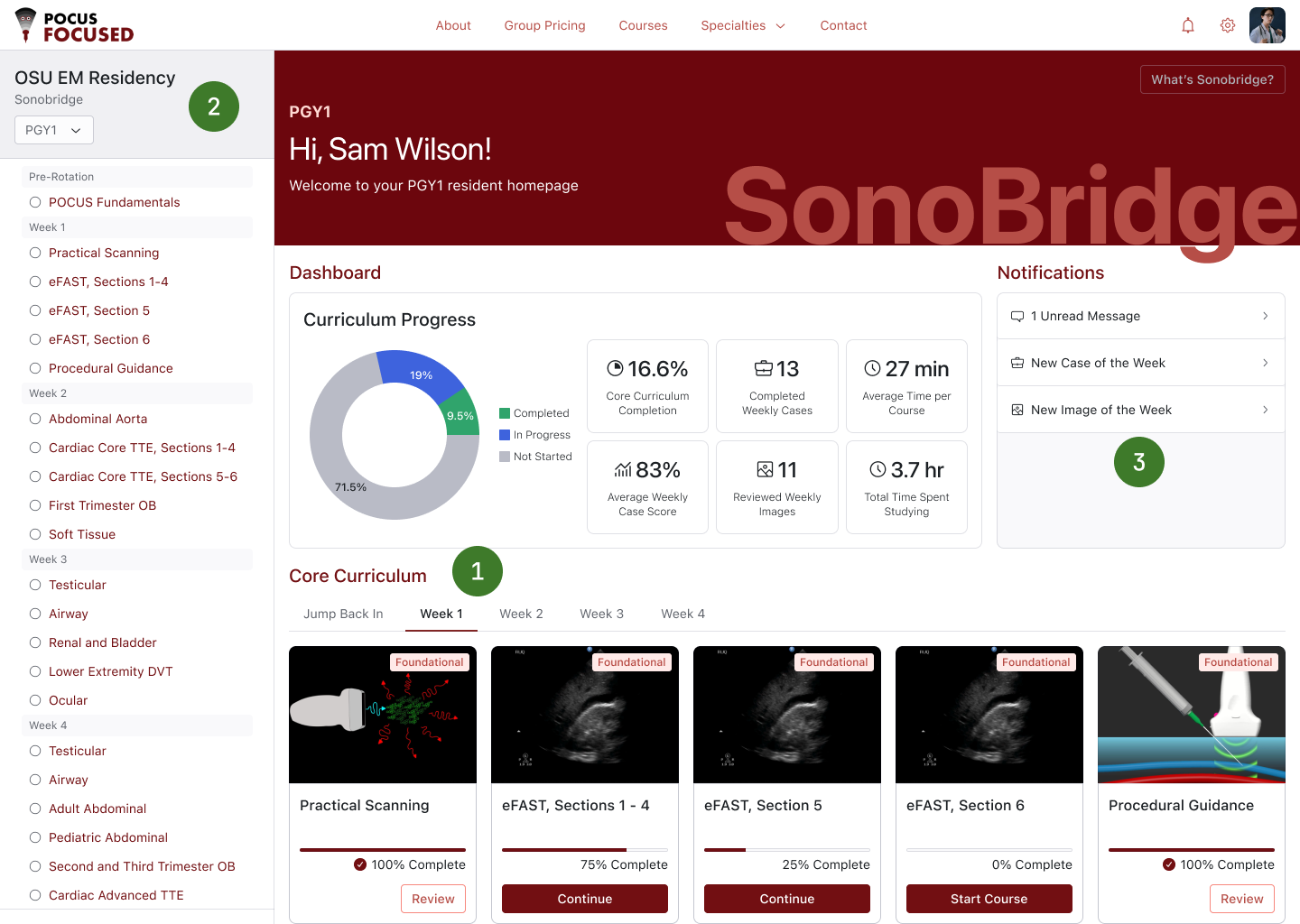
Sonobridge resident dashboard with numbered callouts: 1, weekly course tabs; 2, curriculum sidebar; 3, notifications widget
1

Weekly tabs

Group courses into tabs by rotation week so residents see only one week's worth of courses, not the whole curriculum at once.

2

Curriculum sidebar

A sidebar gives residents a quick, high-level view of their full curriculum and where they are within it.

3

Notifications widget

Notifications live in their own on-screen widget, so residents can see them on the fly and get alerted when new content becomes available.

Outcomes

  • 37 residency programs onboarded to the platform.
  • Active residents show 16% higher engagement.
  • Group managers reported greater satisfaction with their level of control and insight.

Two Sides of the Platform

Same Platform, Different Problems

Authoring content and consuming it are fundamentally different jobs. I treated them as two distinct design problems, each with its own priorities, but halves of the same whole that should feel like an interconnected platform.

Authors needed more control. Learners needed less noise.

Business Side

Compositional Power

Design problem: Give a non-technical physician real control over rich content creation and management without exposing complexity.

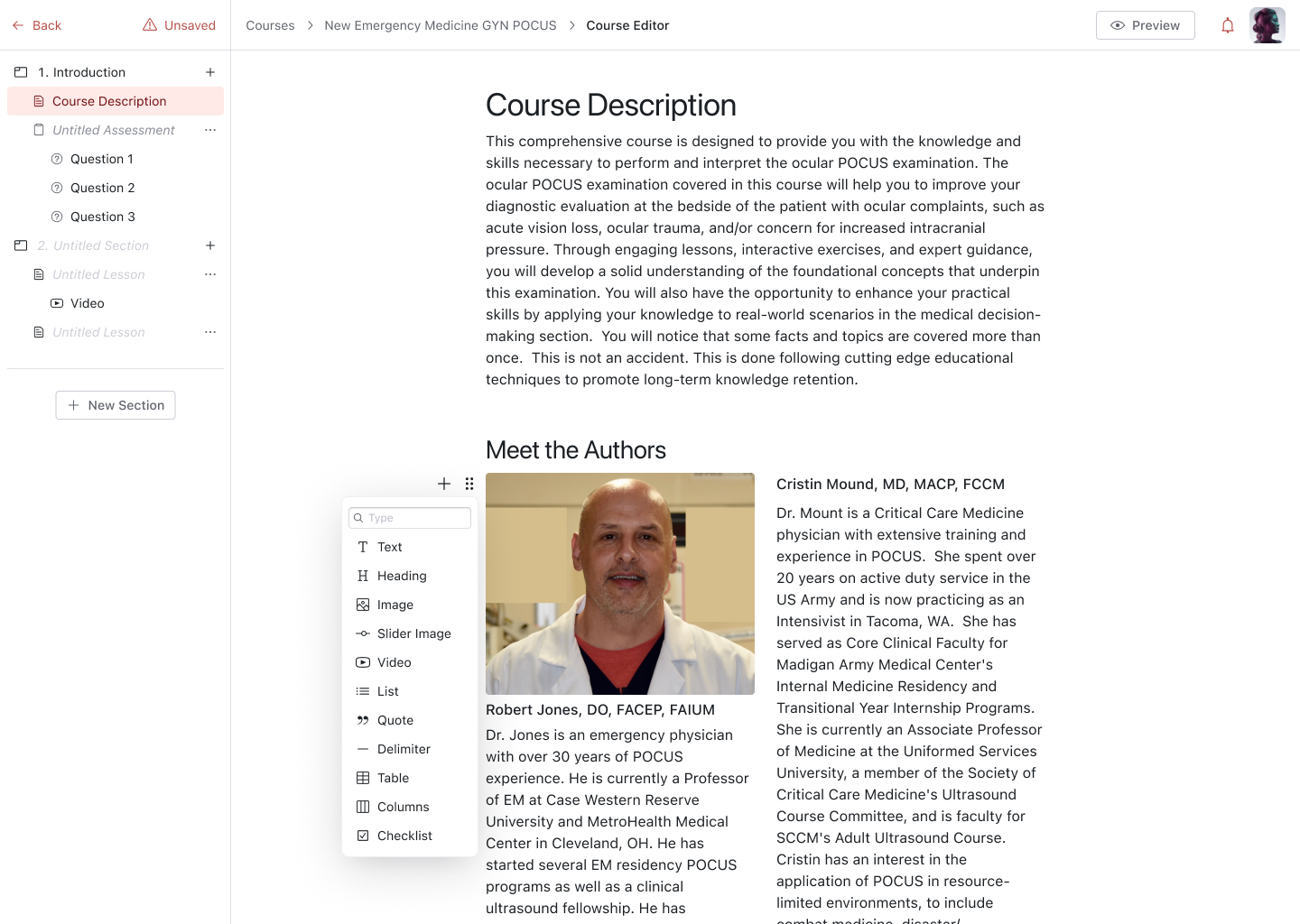
  • Block-based course builderAuthors compose lessons from blocks for different content types: videos, medical imagery, text, structured assessments, presentation decks, SCORM, and more, so they build content without fighting templates, making course creation 50% faster for POCUS Focused than their legacy platform.
  • Supplemental contentCourse authors can also create flashcards and featured content that learners can access from their dashboard for supplemental learning beyond just a course-based format.
  • User & group managementAdmins can invite users, enroll them in courses, organize them into groups, track progress, help troubleshoot issues a group seat manager might face, and email learners directly from the platform.
Course editor showing a course outline sidebar and the block menu for adding text, images, video, tables, and more to a lesson
Learner Side

Clarity & Focus

Design problem: Help a busy clinician make steady progress in short sessions.

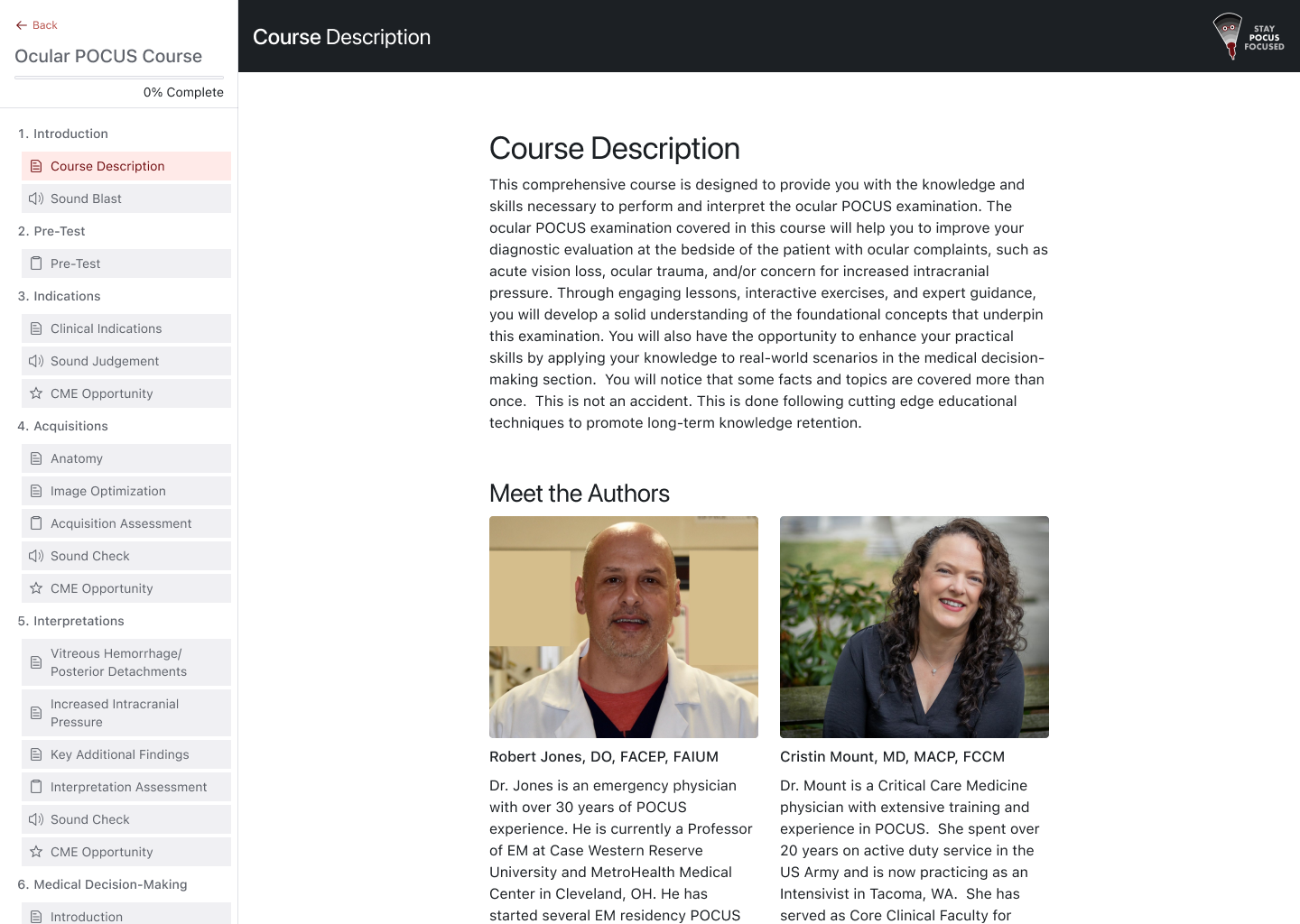
  • Progress at a glanceLearning stats and straightforward progress tracking, so learners always know where they left off with a course, how much they've studied, and what's next.
  • Practice beyond coursesFlashcards, assessments, and featured content reinforce course material and give learners a reason to return to the platform even when they have no courses due.
  • Proof of completionCompleted courses live in one place, with downloadable certificates so learners can showcase their achievements and they can review past content to refresh their knowledge.
Learner view of the same course page, with the full course outline and progress in the sidebar

My Process

Closing the Gap Between Design and Code

With new AI tools, I could easily transition the design from Figma into frontend code by connecting Claude Code to the Figma MCP server, allowing me to blur the line between design and development, making it easier (and more effective) to wear both hats.

What We Gained

Design System Preservation

The very first thing I did was extract design tokens from Figma into style sheets and mirror the 20+ components that I designed in Figma as React components in code.

Figma → Code Pipeline

Nothing was lost in translation because I could oversee the creation of every screen to exactly match how I designed it without having to do the manual translation myself.

Design + Build in Parallel

With design and development overlapping, I could update the design file first, then easily update the build to reflect the change, saving time trying to tweak the styles and UI elements in the code.

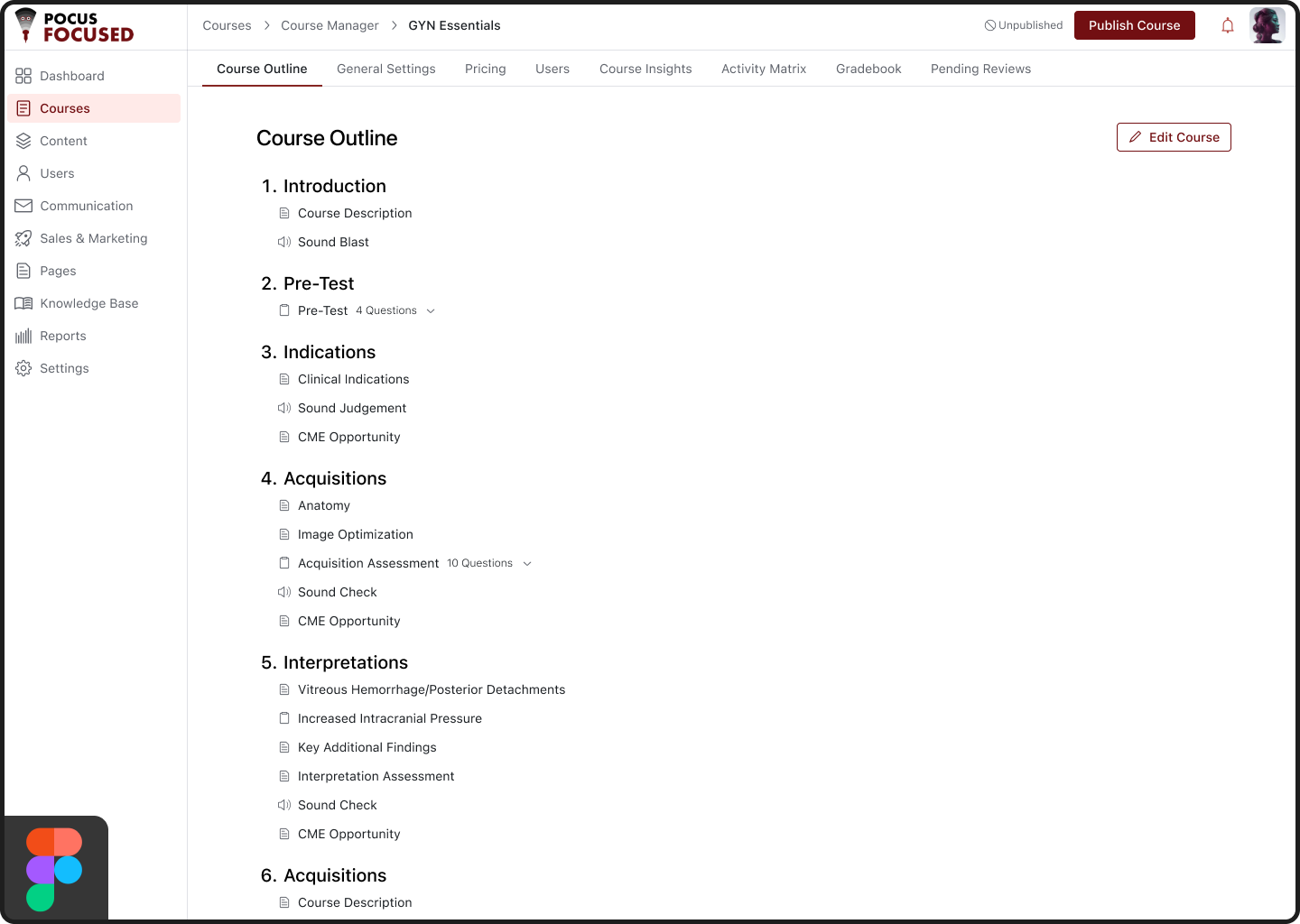
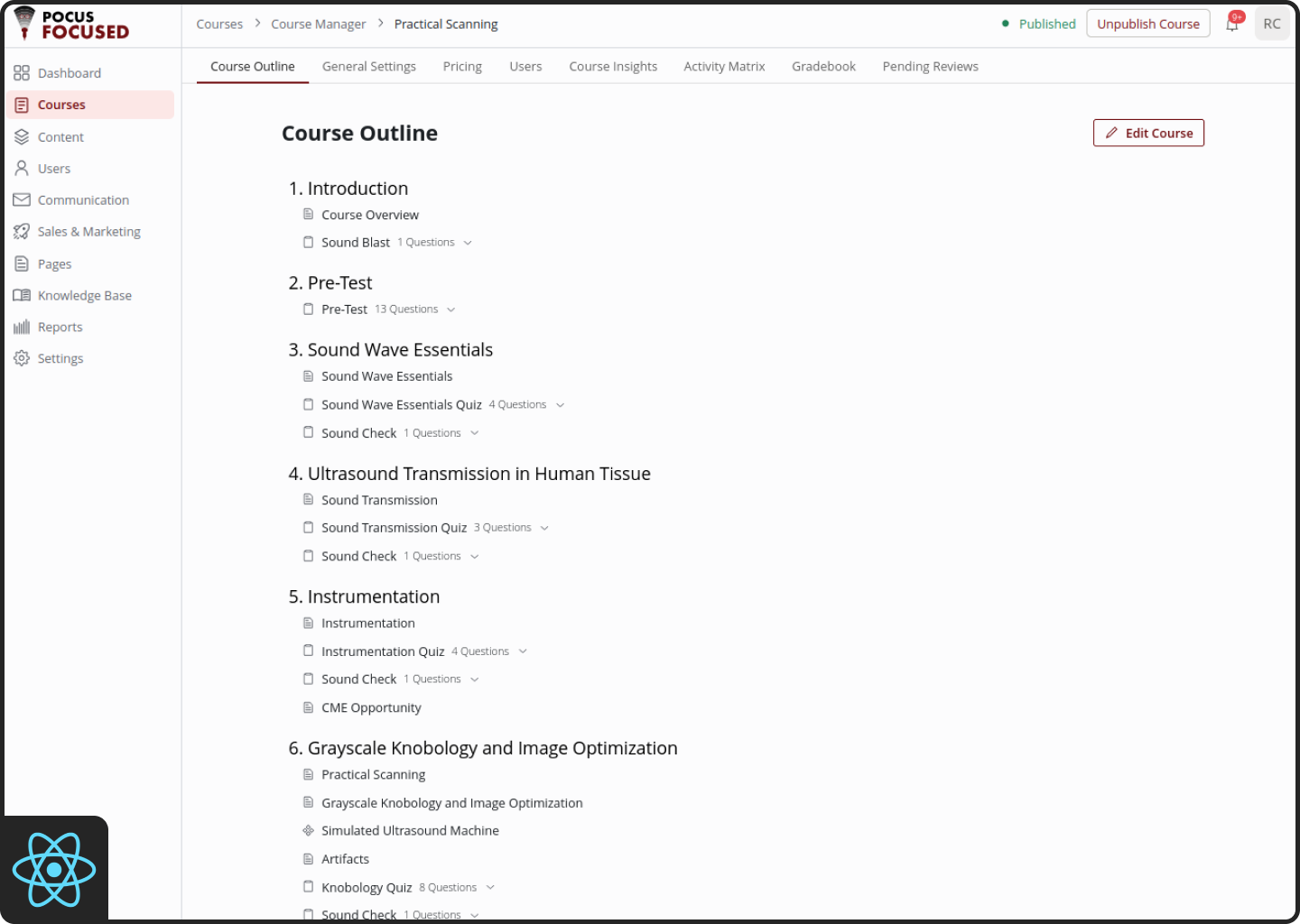
Below is the UI for the course outline screen that an author sees when managing a course. On the left is the screen designed first in Figma, and on the right is the end product we built for the platform. There are several minor differences, but using the Figma MCP server, we were able to build the UI to be nearly identical to the design files with very little effort.

Figma component library for the platform's design system A Figma frame next to the matching shipped screen

My Impact

Impact

A summary of measurable outcomes across product, process, and business dimensions.

Product

6

User roles designed for

Product

20+

Design system components

Product

26

Courses migrated from LearnWorlds

Process

9 mos

From discovery to launch

Process

50%

Faster course creation

Business

✓

Managed scope creep to stay on track for our intended launch date

Business

1,000+

Active users in the first 3 months

Business

✓

Replaced off-the-shelf LMS with a platform the client fully owns

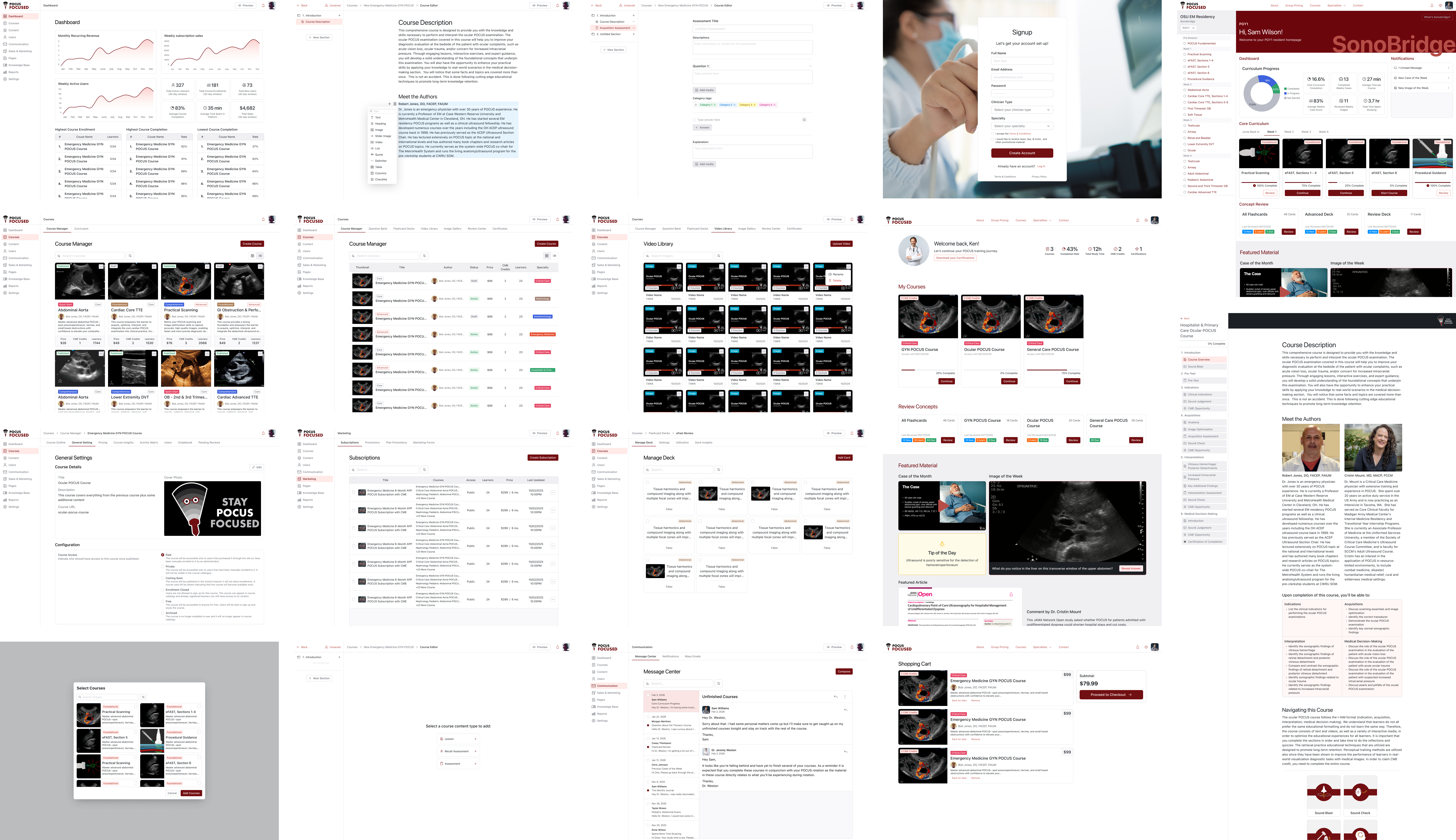
Overview of key POCUS Focused screens across user roles

My Takeaways

What This Project Taught Me

On Complexity

Complexity Belongs in the System, Not the Screen

Designing for six roles and multiple group types reinforced the importance of letting the platform absorb complexity—through shared components, clear role boundaries, and smart defaults—so users can enjoy simplicity. And I had to learn to design this experience while also being the one who had to build around the complexity the experience demanded.

On Building What I Design

Owning the Pixels and the Code

Building the frontend myself held me accountable to the design decisions I made. I made decisions knowing exactly what they'd cost to build, which gave me restraint and empowerment because I knew when the price was worth paying for the sake of the user experience.

On Scope

Not Every Feature Needs a UI on Day One

We optimized our scope to deliver everything the client needed to guarantee a positive end-user experience while minimizing the business's burden during the transition. We did this by deferring features like a page builder for the pocusfocused.com marketing site: we could easily build the first version ourselves, so the page builder itself didn't add value for the end user. We did the same for several other features: we shipped the functionality for the end user and acted as the go-between, making code changes as needed, until the business was ready for its own controls. That kept the launch focused on what learners and authors needed most, and deprioritized everything else.

This was by far the biggest project I've undertaken so far, especially given the resources my partner and I had. Who would have thought it would be so much work for two guys to build an enterprise-level learning platform from scratch? (Yes, that's a joke.) But it was an incredibly rewarding experience.

Want to Learn More?

I'd love to talk about this project, my design process, or how I can contribute to your team.